


Piano Beat: Music Game
4.1105.00 Reviews
App Specs
- Version
- 1.7.6
- Updated On
- License
- Free
- Downloads
- 50,000,000+
- Developer
- Dream Tiles Piano Game Studio
- Categories
- Music
- Platform
- Android
Screenshots
 Analysis by AppCompare
I’ve always liked the small pleasure of tapping along to music, but I’m less interested in a game that demands a long session or a complicated setup. Piano Beat: Music Game is built around a more immediate idea: follow the notes on screen and tap in time. That makes it easy to understand at a glance, though the speed and accuracy needed later on give it more bite than its simple premise suggests.
It’s a music game from Dream Tiles Piano Game Studio, aimed at players who want a quick rhythm challenge rather than piano lessons. I’d treat it as a casual way to engage with music, not as a substitute for learning an instrument. The distinction matters: matching on-screen prompts can sharpen attention to timing, but it doesn’t teach the hand positions, notation or technique you’d need at a real keyboard.
Readable at a glance, with a quick learning curve
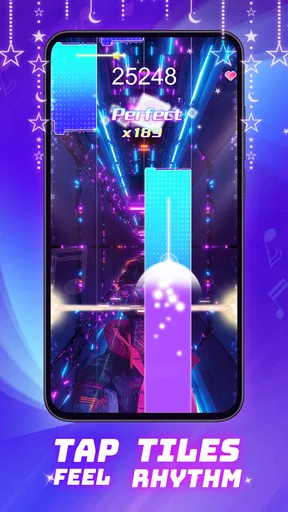
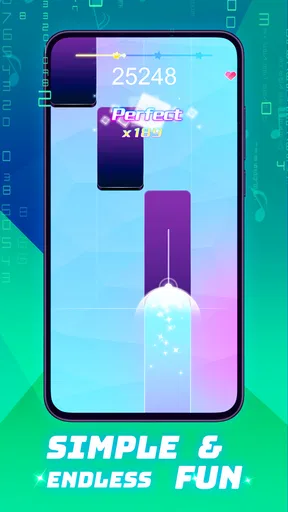
The central interaction is easy to grasp: watch the moving tiles and tap them at the right moment. I find that kind of direct visual cue useful when I want to start playing without first navigating a complicated set of rules. The interface is described as straightforward, and the game’s basic loop gives newcomers a clear place to begin: look, anticipate, tap, then adjust to the next sequence.
That simplicity has a trade-off. A fast-moving sequence can become hard to follow if you lose your place, and the game’s appeal depends on seeing the cues and responding promptly. I wouldn’t assume that a simple screen automatically makes a rhythm game easy for everyone. If small moving targets or rapid visual changes are uncomfortable, I’d try a short session first and see how it feels rather than committing to a long run.
Get Ready to Feel the Rhythm
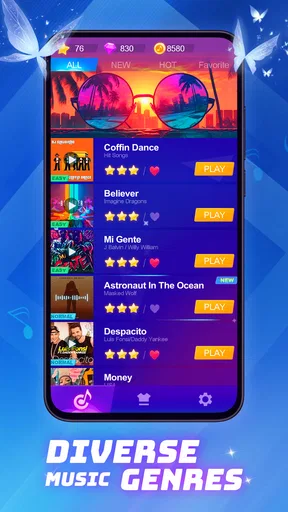
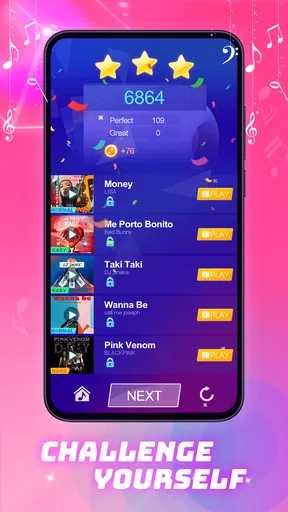
First off, Piano Beat: Music Game is all about immersing yourself in a world where music meets gaming. The whole idea is to hit the right notes as they glide down the screen in sync with the music. It’s kind of like being in your own personal concert! The app offers a wide variety of songs, ranging from classical masterpieces to pop hits, so there’s something for everyone.
The Gameplay Experience
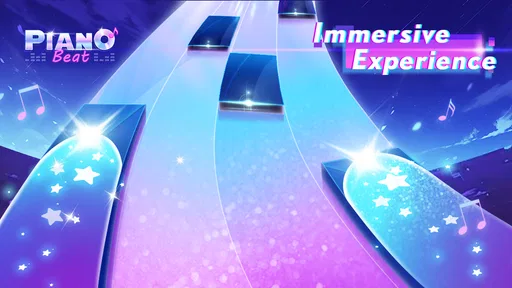
Let’s dive into how it works. When you open the app, you’re greeted with a sleek interface that’s intuitive and easy to navigate. The gameplay is simple: tap the tiles as they hit the bottom of the screen. Sounds easy, right? But don’t let that fool you! As you progress, the pace picks up, challenging your reflexes and timing. It’s addictive, let me tell you!
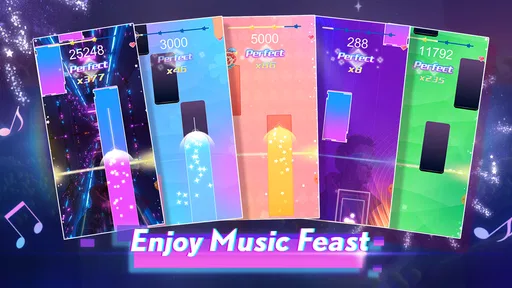
The app offers several levels of difficulty, so whether you’re a beginner or a seasoned pro, you’ll find a challenge that suits your skill level. Plus, the thrill of hitting a perfect streak and seeing your score climb is incredibly satisfying.
Worth Reading Before You Choose

Baby Panda World Brings Quick Play to Modern Phones, but Its Game Library Feels Busy

ESPN’s Live Game View Makes Following Close Games Easier

QuizzLand Review: A Good Fit for Short Trivia Breaks, Not Every Player

Basketball Stars: Multiplayer Is Fast, but Can It Recover When Matches Go Wrong?

WEBTOON Turns Phone Updates Into a Better Reading Routine

Link to Windows Runs on Shared Habits, Not Social Feeds
Motor demands, sound, and sensory comfort
The game asks for quick, repeated taps, so it may suit someone who enjoys testing coordination and timing, but it can be demanding if rapid finger movement is difficult or tiring. I’d start with a calmer difficulty, keep sessions brief, and stop when accuracy begins to feel like strain. Those are practical ways to judge whether the game’s pace works for you; they don’t change the fact that its main interaction relies on tapping.
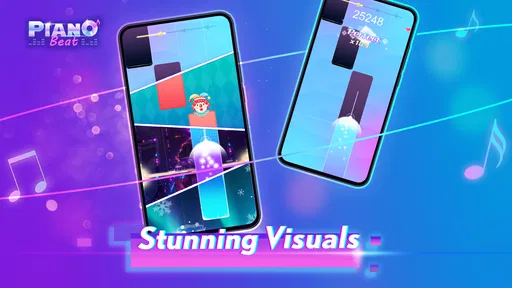
Music is central to the experience, and the colorful visuals and animated notes reinforce the beat. That can make a song feel engaging, but sound and motion can also be a lot in a noisy or sensory-sensitive setting. I’d lower the device volume or play somewhere quieter when needed, and take a break if the moving tiles become distracting. The game is best approached as a focused rhythm activity, not something to keep running in the background while attention is elsewhere.
Short sessions, everyday settings, and practical trade-offs
For me, the most realistic use is a brief break: waiting for a drink, sitting at home between tasks, or winding down when I want something more active than scrolling. A useful habit is to choose the difficulty before starting and give myself a clear stopping point. That keeps a quick round from turning into an irritating attempt to recover a streak when I’m tired or in a hurry.
It is less suitable while walking, crossing a street, or doing anything that needs steady attention. The game asks you to watch moving cues and time your taps, so playing in those situations can distract you and lead to missed notes. It also depends on having a device and enough comfort with touch controls. If you want an activity that works without looking at a screen or moving your fingers quickly, a music-listening app is a better fit.
How it differs from lessons and other rhythm games
Compared with a piano-learning app, this is the lighter choice: it turns music into a timing challenge instead of asking you to practise scales, read notation or build technique. That makes it easier to pick up for a few minutes, but it won’t help you progress on a physical piano in the same structured way. Compared with rhythm games that use more elaborate controls or longer sessions, its tap-based premise is more immediate; the trade-off is that the same core action may feel repetitive if you want deeper musical control.
The song selection spans classical and pop, which helps the game feel less tied to one musical taste. Still, a familiar tune does not guarantee that its sequence will match how you would play it on an instrument. I’d choose it for the rhythm challenge and the satisfaction of keeping time, not for faithful piano practice. If you’re deciding between this and lessons, ask yourself whether you want to learn music or simply interact with it in a playful way.
Who will enjoy it, and what to check before settling in
I’d recommend trying it if you like music, short score-based challenges and the feeling of improving your timing through repetition. It can work well for someone new to rhythm games because the basic action is easy to understand, while the rising pace gives more experienced players a reason to keep testing themselves. If you prefer patient practice, dislike tapping under time pressure, or need a game that does not depend on visual attention, it may not be the right match.
A sensible way to evaluate it is to play a short round at a comfortable pace, check whether the tiles remain easy for you to track, and notice whether the music and motion feel enjoyable rather than tiring. Don’t judge your ability by one missed sequence: rhythm games reward familiarity, and a brief pause can be more useful than repeatedly chasing a perfect run. This is also a good point to consider your surroundings; headphones may help you focus in a busy place, but keep the volume comfortable and stay alert to what is happening around you.
Cost, age suitability, and what the audience suggests
The game is free to download, with optional in-app purchases priced from $0.99 to $39.99 per item. I’d check what a purchase offers and whether it is something you actually want before paying; the free entry point makes it possible to decide whether the basic rhythm loop suits you first. It is rated Teen, so it is not automatically a fit for every child or family. I’d look at the game together with younger players and use your own judgement about the content and spending choices.
It has a 4.5 average from around 20,000 ratings and more than 10 million installs, which suggests that plenty of players have tried it, though popularity alone cannot tell me whether its pace or presentation will work for you. The current version is 1.6.7, and it runs on Android 6.0 or later. Those details are useful when checking compatibility, but the better test is still whether the game’s tapping, visuals and music feel comfortable on your own device.
Visuals and Sound
The visuals in the app are nothing short of stunning. The vibrant colors and smooth animations add to the overall experience, making it visually appealing. But the real star of the show is the sound quality. The app uses high-quality audio tracks that make you feel like you’re sitting in front of an actual piano. It’s this attention to detail that really sets it apart from other music games.
Customization and Features
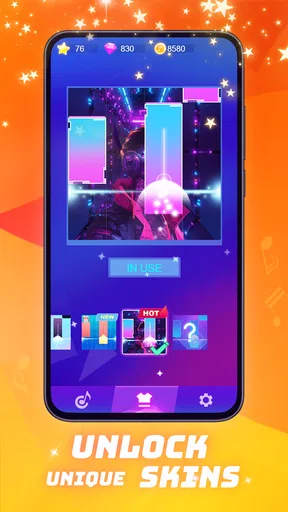
One of the coolest features is the ability to customize your gameplay. You can choose different piano skins and backgrounds to suit your mood. And if you’re feeling competitive, the app offers a leaderboard where you can see how you stack up against players worldwide. It’s a great way to add a little friendly competition into the mix.
Moreover, the app frequently updates its song library, so you’ll always have something new to play. Whether it’s the latest chart-toppers or timeless classics, the variety keeps the game fresh and engaging.
Why You Should Give It a Try
So, why should you download Piano Beat: Music Game? Well, if you love music and enjoy a good challenge, this app is a perfect blend of both. It’s a great way to unwind after a long day or kill some time while waiting for your coffee to brew. Plus, who knows? You might even improve your rhythm and timing along the way!
In short, Piano Beat: Music Game offers a fun and engaging way to experience music. The combination of beautiful visuals, high-quality sound, and challenging gameplay makes it a must-try for music lovers and gamers alike. So go ahead, give it a download, and let the music take over!
My inclusive verdict
I see this as an approachable music game with a clear central action, options for different challenge levels, and enough visual and audio energy to make short sessions engaging. Its most inclusive quality is that you can understand the basic goal quickly; its main limitation is just as clear: playing well depends on tracking moving tiles and making timely taps. That makes personal comfort with screen motion, sound, and repeated finger movement more important than the game’s broad appeal might suggest.
I’d give it a try if a quick, visual rhythm challenge sounds fun and you can play in a setting where you’re free to focus. I’d skip it in favor of lessons if your goal is practical piano skills, and choose a less screen-dependent activity if fast visual tracking or tapping is not comfortable for you. For everyone else, a short trial is a sensible way to see whether its particular mix of music, motion, and timing feels rewarding.
Pros
- Engaging rhythm gameplay keeps you entertained.
- Wide variety of popular songs to choose from.
- Smooth graphics enhance the overall experience.
- Customizable difficulty levels for all players.
- No internet required for offline play.
Cons
- Ads can be intrusive and frequent.
- In-app purchases needed to unlock some songs.
- Limited free song selection initially.
- Occasional lag in high-performance devices.
- Some features locked behind paywalls.
FAQs for Piano Beat: Music Game
What is Piano Beat: Music Game about?
Piano Beat: Music Game is an engaging rhythm game that combines the excitement of music with the challenge of tapping tiles. Players can enjoy a wide selection of popular songs while testing their reflexes and timing. The game offers various difficulty levels, catering to both beginners and seasoned players.
Is Piano Beat: Music Game free to play?
Yes, Piano Beat: Music Game is free to download and play. However, it does offer in-app purchases that allow players to unlock additional songs, remove ads, or gain other premium features. These purchases are optional and not necessary to enjoy the core gameplay experience.
Can I play Piano Beat: Music Game offline?
Piano Beat: Music Game does offer offline play, allowing users to enjoy most of the features without an internet connection. However, some features, like downloading new songs or accessing certain updates, may require an internet connection. It’s a great option for gaming on the go without using mobile data.
What are the device requirements for Piano Beat: Music Game?
Piano Beat: Music Game is available on both Android and iOS platforms. For Android users, the game typically requires Android version 5.0 or higher, while iOS users will need iOS 9.0 or later. These requirements ensure smooth gameplay and access to all features.
Does Piano Beat: Music Game support multiplayer mode?
Currently, Piano Beat: Music Game focuses on single-player experiences, allowing users to enjoy the music and challenge themselves individually. While it does not offer a traditional multiplayer mode, players can connect with friends online to share scores and compete on leaderboards.


